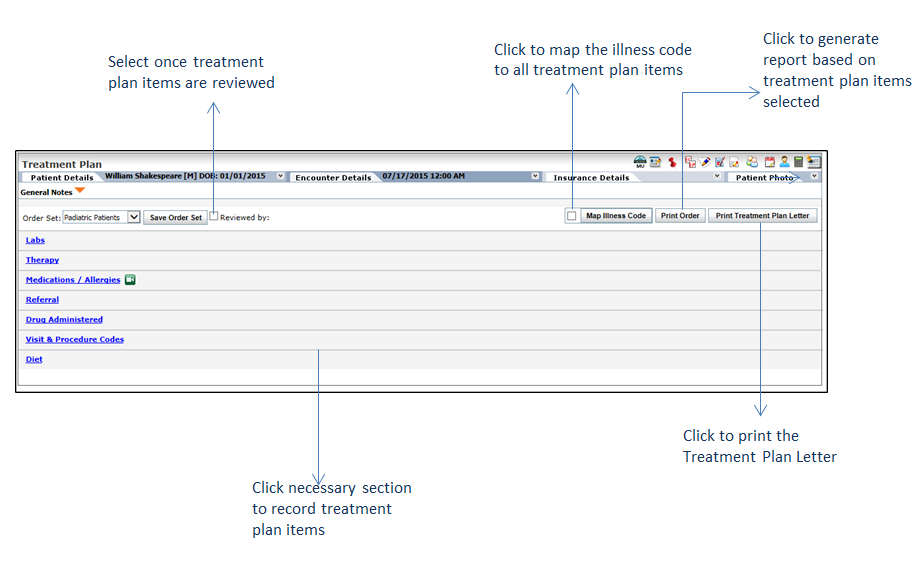
The Treatment Plan tab helps users recording all the elements required for patient’s treatment that are eventually displayed on the Encounter note. The user can order the labs, radiology, and special studies tests, add visit and procedure codes, add diet and activity information, add therapy details, add preventative health information, record medication and allergies, and also record the drug administered, if any. The user can map up to 4 illness codes with each of the items recorded in treatment plan. On the Facesheet screen, click the Treatment Plan link from the charting elements ribbon displayed on top. When treatment plan items are not recorded, they are displayed with black fonts. Once any of the treatment plan items is recorded, it is displayed with a green bold font.
For details on configuring treatment plan, refer to Treatment Plan under Administration.
Following are some important points the user can keep in mind while working with the Treatment Plan. The user can:
| • | View collapsible panels that enable them to toggle between the treatment plan items quickly. |
| • | Save the records just by clicking an item (no need to click the Save button every time). |
| • | View the summarized information of treatment plan items on the Treatment Plan landing page. |
| • | Do a quick configuration of the master values directly from the Charting section using the wheel ( ) icon. ) icon. |
| • | Map the illness codes with each treatment plan item individually. |
| • | Map all the entered illness codes (up to 4) with all the treatment plan items with a single-click. |
| • | Print the report for each treatment plan item on a separate page. |
| • | View the Encounter note grouped by diagnosis codes. |
| • | Send electronic lab orders. |
| • | Assign order status individually to each item in Labs (for manual orders), Radiology, Special Studies, Preventative Health, General/Other, and Visit & Procedure Codes sections. |
| • | Provide generalized notes related to patient’s treatment plan that is printed on the Encounter note. |
| • | Save all the items of order set in single-click. |
| • | Set the sequence of treatment plan items displayed on landing page. |
| • | Print the detail treatment plan letter. |
For details on configuring treatment plan letter, refer to Treatment Plan Letter Configuration under Administration.
Note: Once the treatment plan items are reviewed, select the Reviewed by check box. Your name will display as a reviewer along with date and time.