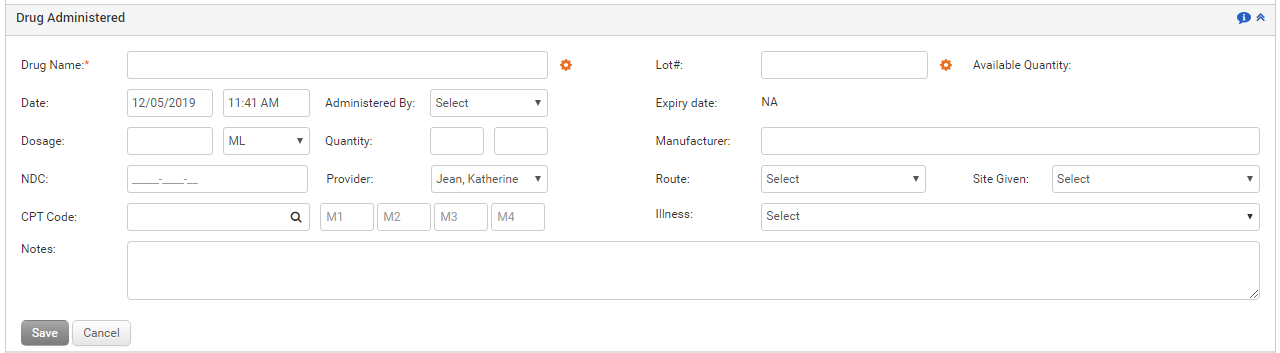
Any additional drugs administered to the patient are recorded in the Drug Administered section. The provider may want to prescribe drugs that are not available in the medications list. Such drugs can be added in the Drug Administered section. The user can record the drug name, dosage details, quantity, route and site used to administer the drug, lot number from which the drug is used, expiry date of the drug, manufacturer, and notes. Also, illness codes can be associated with the administered drug. All this information is displayed in the subsequent grid.
Once the administered drug is recorded, it appears on the Drug Administered ribbon.
To record an additional administered drug in Treatment Plan:
| 1. | On the Treatment Plan screen, click the Drug Administered link. |
| 2. | Select the date using the calendar button, and enter the time when the drug was administered. |
| 3. | Select the name of the person who administered the drug from the drop-down list. |
| 4. | Select the provider name who prescribed the drug for the patient from the drop-down list. |
| 5. | Enter the name of the administered drug. This is a mandatory field. |
| 6. | Enter the relevant drug details: Dosage, Quantity, Lot Number, Expiry Date, and Manufacturer. |
| 7. | Select the Route and Site Given through which the drug was administered from the drop-down list. |
| 8. | Enter any notes pertaining to the additional drug administered in the Note box. |
| 9. | Hover mouse over the Illness section. A list of illnesses recorded in the Diagnosis section of that encounter appears. Maximum 4 illnesses can be selected. |
| 10. | Click Save. The recorded drug details appear in the following grid. |
| 11. | Once the additional administered drug is recorded, it can be viewed on the Therapy ribbon along with the diagnosis codes attached. |
Notes:
| • | Click the edit icon to edit the drug details. to edit the drug details. |
| • | Click the delete icon to delete the drug details. to delete the drug details. |