Ordering Labs

Contents
Based on the patient’s physical conditions, provider may want to recommend certain medical tests to be performed to confirm that the patient is free from the disease. You can place the orders electronically from this section. These orders appear on the Encounter note.
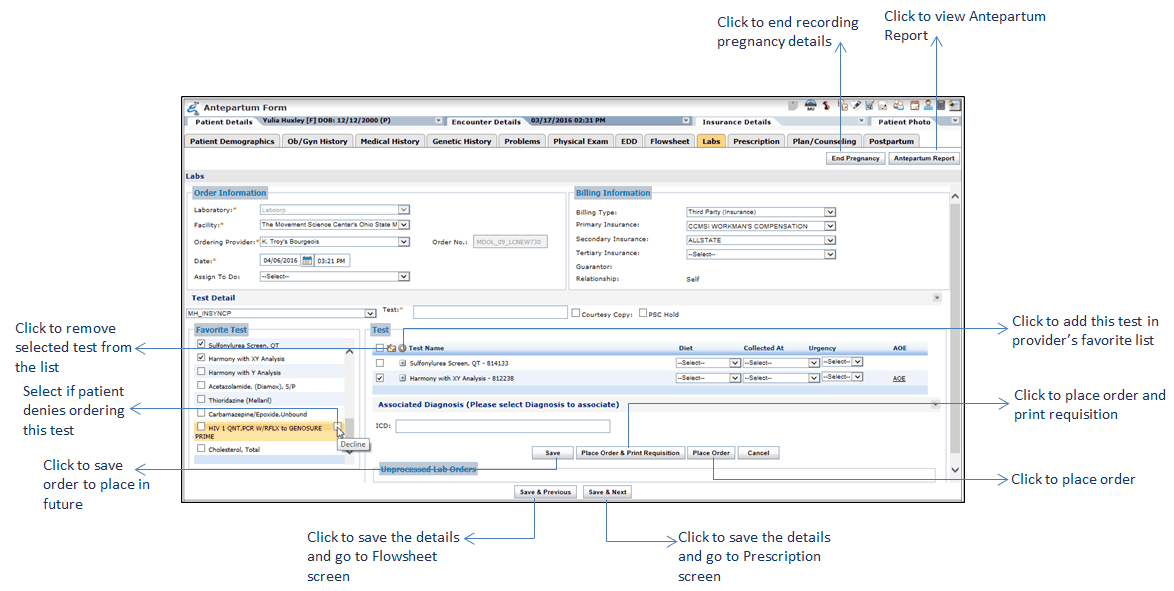
Patient may want to decline ordering HIV related tests. In such cases, you can select the check box next to the test name to record patient’s declination. System disables all such tests and excludes them when placing an order to the lab. Also, you can view the HIV related tests with Declined status on the Antepartum Report.
Note: You cannot place manual lab orders from the Labs section of Antepartum Form.
To place an order specifically for patient's antepartum, click the Labs section on the Antepartum Form. For detailed information on placing orders, you can refer to the Placing Orders Electronically section.