Recording Postpartum

Contents
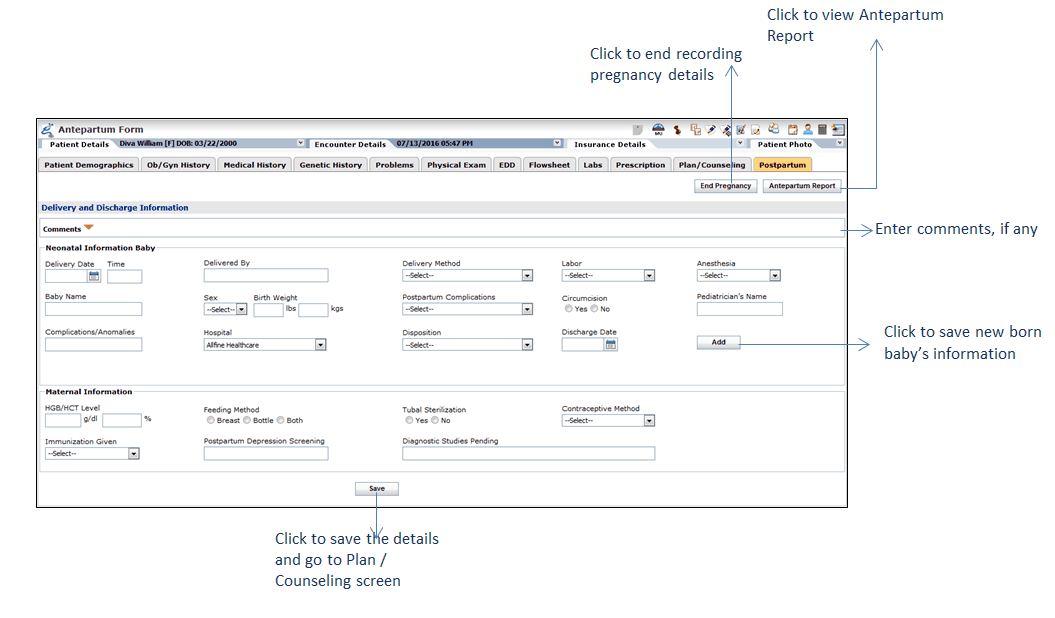
The Postpartum section allows recording the patient’s and newborn baby’s information once the baby is delivered. This information can be recorded in two sections; Neonatal Information Baby and Maternal Information.
The Neonatal Information Baby section captures the detailed information about newborn babies that includes delivery date, time, method, labor, anesthesia, and so forth. The information of multiple babies can be recorded in this section, in case of having multiple births. The Maternal Information section records HGB/HCT Level, Feeding Method, Tubal Sterilization, Contraceptive Method, Postpartum Depression Screening, Diagnostic Studies Pending, and Immunization Given.
Postpartum Information is displayed only when printing the Encounter note with Antepartum Report. When printing the Antepartum report from the Antepartum Form charting element, postpartum information is not displayed.
To record patient's postpartum details:
| 1. | In the charting elements ribbon, click Antepartum Form. |
| 2. | Click Postpartum. |
| 3. | In the Neonatal Information Baby section, enter or select appropriate options to record information of the newborn baby. |
| 4. | Click Save. The information is then displayed in the grid. |
| 5. | Add information about the second baby, in case patient had delivered multiple children. |
| 6. | In the Maternal Information section, enter or select the appropriate options to record information about the patient after the delivery. |
| 7. | Enter Comments, if any. |
| 8. | Click Save & Previous to save Postpartum information. |