Recording Genetic History

Contents
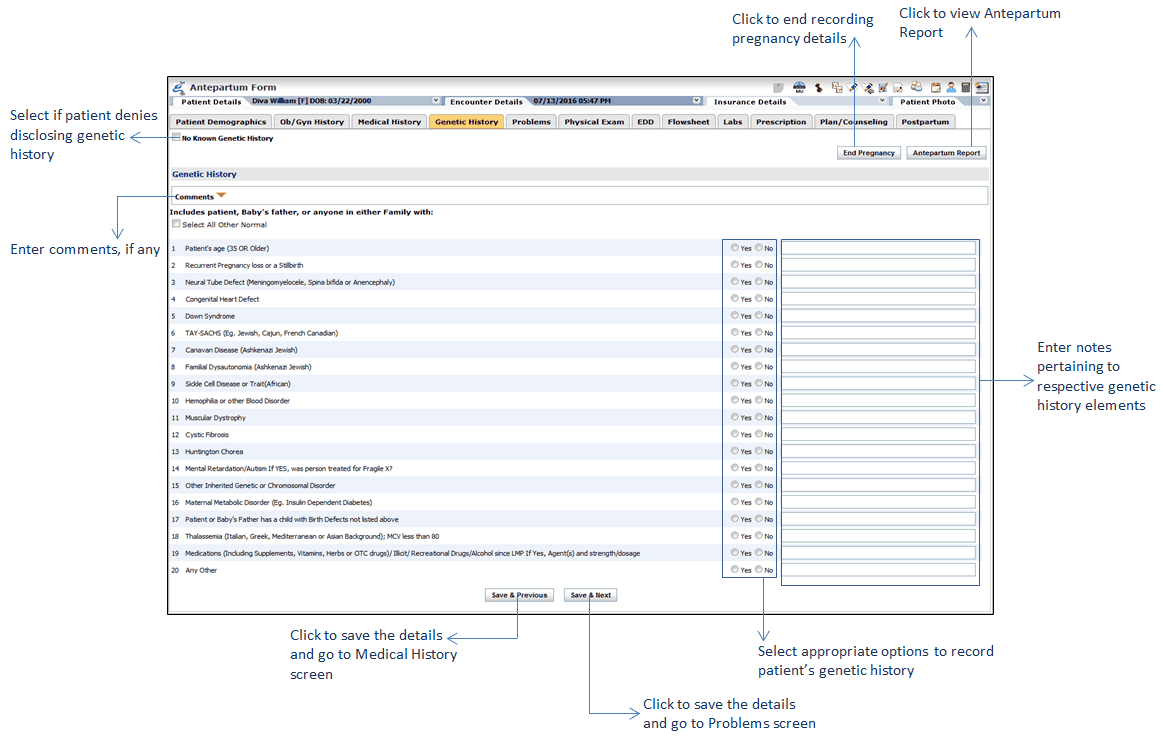
The Genetic History of the patient can be captured when recording Antepartum Form and patient’s history from the History module, either from patient demographics or from the History section in encounter. Patient’s genetic history appears on Antepartum Report and Encounter note.
To record patient's Genetic History:
| 1. | In the charting elements ribbon, click Antepartum Form. |
| 2. | To open genetic history section, click Genetic History. |
| 3. | If patient does not know or denies to disclose genetic history, select the No Known Genetic History check box. |
| 4. | In the Genetic History section, select appropriate options to record patient's genetic history. |
| 5. | To enter notes specific to any element of genetic history, enter the notes in the text box provided next to that element. |
| 6. | Enter Comments, if any. |
| 7. | Click Save & Next. The Problems screen is displayed. |