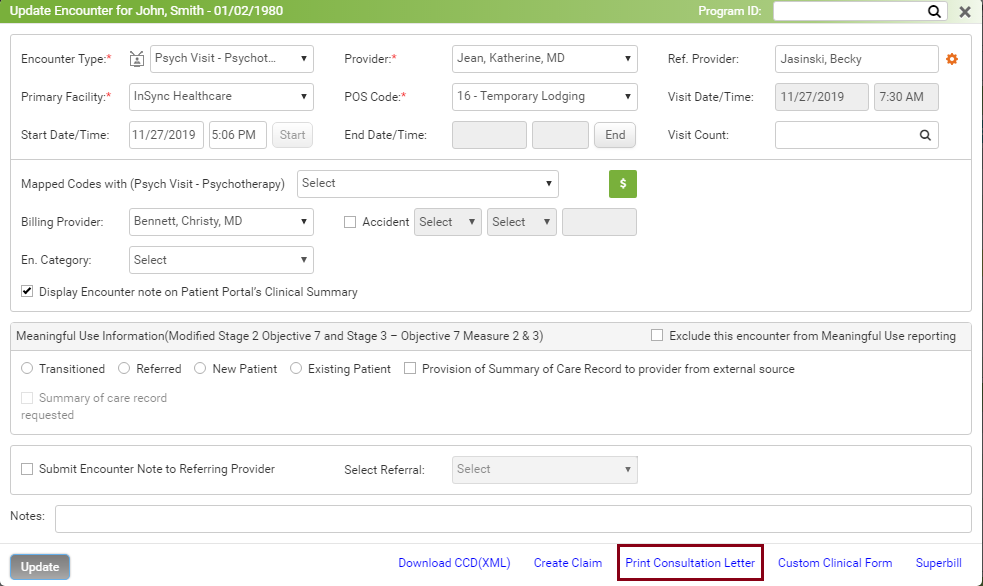
The Consultation Letter is a letter given to the provider who has referred the patient to the practice. The letter has all the details of the patient during the visit.
To print the consultation letter:
| 1. | On the Facesheet screen, expand the Encounter Details panel. |
| 2. | Click the icon  for the encounter for which you want to print consultation letter. The visit details of the patient are displayed. for the encounter for which you want to print consultation letter. The visit details of the patient are displayed. |
| 3. | Select the Referring Provider. |
| 4. | Click Print Consultation Letter. The Consultation Letter screen is displayed. |
| 5. | Click Print & Preview. The letter is then printed. |
Notes:
| • | The consultation letter format can be configured. For details on configuration refer to the Consultation Letter. |
| • | The Send Fax button is displayed only when configured for that practice. |
| • | Once you print the consultation letter, it automatically gets saved on the Document Manager screen. Users can access the previously generated consultation letters from Document Manager screen. |